
Basic Cutscene Skipping
What It Does
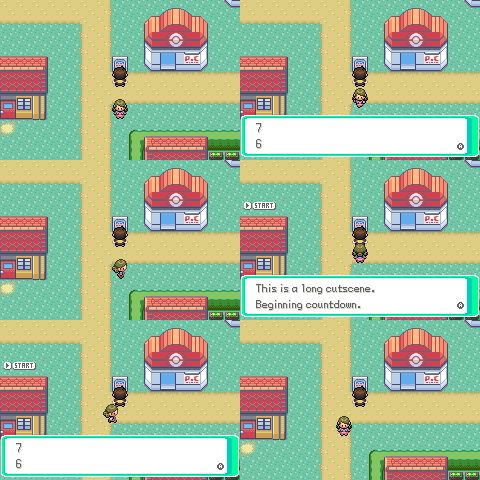
Adds startcutscene and endcutscene scripting macros. Place startcutscene at the beginning of any scripted cutscene and endcutscene at the end. If the player has already seen that cutscene, the game will create a sprite to indicate that it can be skipped at a button press, running a defined script if skipped.
How It’s Implemented
The feature adds five files, including src/cutscene.c containing the skip logic, include/constants/cutscene.h containing cutscene IDs constants in an enum, src/data/cutscene.h containing the sCutsceneSkipScripts[] table that maps each cutscene to its skip script and optional flag.
Cutscene tracking has two options, set by changing CUTSCENE_FLAG_TRACKING in include/cutscene.h.
- Flags (default): Each entry in
sCutsceneSkipScriptscan reference a flag and will not require extra save space. - SaveBlock bits: Setting
CUTSCENE_FLAG_TRACKINGtoFALSEstores viewed state directly in the save block, storing 8 cutscenes flags per byte. This will allow the developer to just create a cutscene and forget about it.
Installation
The diff for this feature can be used to add these changes.
By default the macro uses VAR_0x8004 to pass the cutscene ID. If as a pokeemerald-expansion user you’d rather not consume that VAR, perform two small changes swap it to ScriptReadByte instead, one line in event.inc and one in cutscene.c.
@ Starts the given cutscene which can be skipped if seen before.
.macro startcutscene scene:req
- setvar VAR_0x8004 \scene
callnative StartSkippableCutscene
+ .byte \scene
.endm
- u32 cutscene = gSpecialVar_0x8004;
+ u32 cutscene = ScriptReadByte(ctx);
Why It’s In Ikigai
Pokémon Ikigai has story moments the player will encounter more than once, before fights that may cause them to whiteout, for example. Sitting through the same unskippable dialogue is tedious, so skippable cutscenes have been standard in games for a long time.