
Rotom Phone Start Menu
Why I Made It
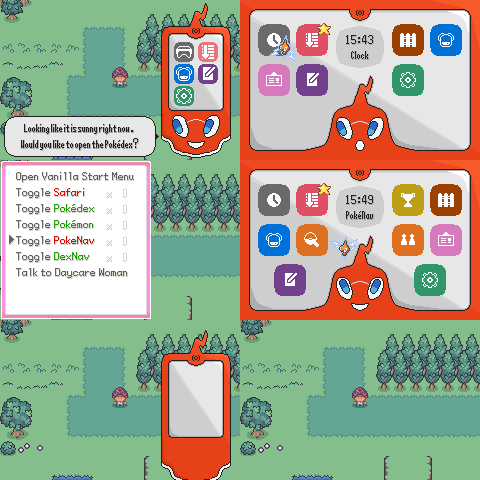
I even made this terrible text to speech phone advert.
I made this originally to be a bespoke start menu for Pokémon Ikigai, as I’ve always loved the Rotom phone. A loveable annoying friend in your pocket, that has some personality compared to the inanimate start menu and Pokédex UIs. However after Phantonomy mentioned how they’d like to create something similar for Pokémon Ultra Eclipse, I wanted to share this with them and other developers alike.
What It Does
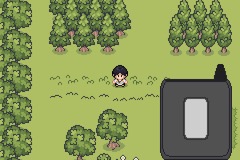
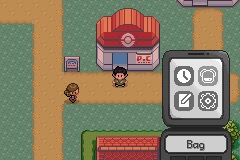
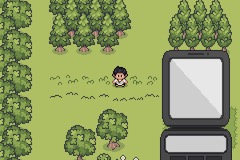
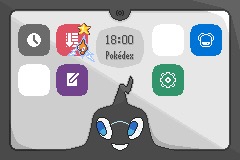
A complete replacement for the vanilla pokeemerald start menu, styled as a Rotom Phone. There’s also a generic flip phone option for games that don’t want the Rotom branding or it’s useful as an early game option before the player would receive a Rotom upgrade. The menu comes with sixteen colour palettes: OG Rotom, black, red, yellow, green, purple, blue, turquoise, rose, brown, dark green, wine red, navy, white, lavender, and gold. It was amazing seeing these all on original hardware, and knowing players will have the option to choose their favourite is satisfying for a developer.
The Two Modes
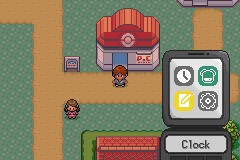
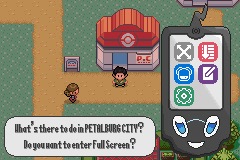
Overworld Menu: the phone slides up from the bottom of the screen. Rotom is visible and animates across ten expressions: happy, sad, surprised, smug, confused, scared, tired, love, angry, bored, and delivers periodic text messages at configurable intervals: greetings, goodbyes, personality quips, weather and time readouts, safari info. Up to six menu options appear as icons on the Rotom Phone and four on the generic flip phone each with a colour-coded palette, flashing when selected.
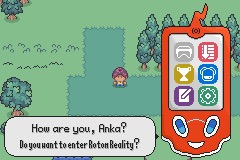
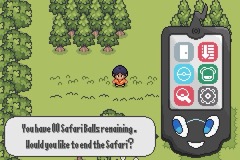
Rotom Reality: a fullscreen interface with up to ten options per page, arranged in a 3 column grid. Options either open new screens or trigger a sliding panel that appears from the bottom, used for things like Daycare status. Pressing START acts as a shortcut to directly enter a starred favourite option.
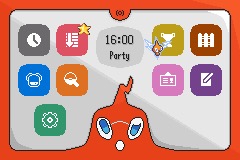
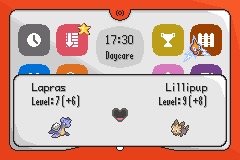
There’s also a custom save screen that replaces the vanilla save UI when it is accessed from Rotom Reality, which can be customised by swapping out the tiles, tilemap, and palette in graphics/rotom_start_menu/save_screen/.
How It Went
The feature was developed across three weeks for Pokémon Ikigai before being ported to a standalone branch in July 2025.
Development started first with the overworld flip phone, a bunch of icons, that as someone with very little artistic ability, I’m really proud of. The Rotom Phone variant followed on quickly. The first slide animation used simple linear motion, however I wanted a more visually appealing look, so the ComfyAnims library was integrated. Rotom’s face was added as a large sprite with multiple animations, that ate up a lot of VRAM (we’ll come back to that later), and the speech window tilemap was put in place. I really wanted to reflect just how annoying a massive yapper like Rotom can be, so began to add speech text that still reminds me of someone you accidentally made eye contact with, continually making small talk.
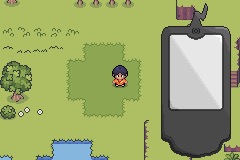
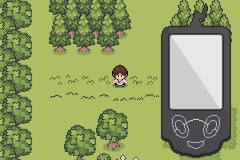
Next, I wanted to add a fade in and out for Rotom’s face, after the slide animation and the bootup sound, just to add a bit more personality to the Rotom Phone ‘waking up’. Thanks to Bivurnum’s Easy Fade Title Screen Colors, I then worked on icon palettes, adding the monochrome config option, and easing spring physics from ComfyAnims replaced the earlier linear approach for both the face sprite and icon colour fading as well.
After that the next big addition was attempted to build what would become ‘Rotom Reality’, at this point under the working name ‘Full Screen’ as something completely separate from the overworld menu. However, as soon as Rotom’s face was brought into that mode, I saw the vision, and Rotom Reality was born. Knowing I’d want to add multiple palettes, the EWRAM palette buffer system was added, allowing its state to persist between the two menus without reloading.
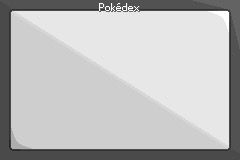
It was at about this time, I made a PR of the work so far to the Ultra Eclipse repository, and Phant began to help me with testing. He immediately brought opened the menu on a route with multiple objects and found so many tiling errors. The humongous VRAM usage had immediately caught up with me, so functions to limit how many Rotom face animations were added. I don’t know why I didn’t reduce the size of the face sprites to be honest.
As June neared its end, documentation was started in the header file. I realised how much less fun I find writting things up (ironic), and an idea for a custom save screen was drafted. Thanks to Phant, the new palettes were made before everything was published as the public standalone branch on 6th July.
How It Works
The menu hooks into the game by replacing the vanilla start menu callback, returning to whichever menu was last used after closing an option.
The Overworld Menu loads the phone as a background on top of the overworld and animates it sliding up from the bottom of the screen, as I thought it looked more natural than just appearing. Rotom’s face is a separate animated sprite cycling through its expression states on a configurable timer, and the menu option icons are packed onto a 32×32 spritesheet, one for the overworld menu, two for Rotom Reality’s larger grid.
I had to settle on an important constraint: no two overworld icons that appear on screen simultaneously can share the same colour, each icon uses PAL_ICON_WHITE and one unique colour from indexes 1–9. This is so the colour can be faded for selection. Even still, I think it’s worth it, I didn’t want to mess with affine animations to have the icons move, but the individual fading colours are just as satisfying in my opinion.
Rotom Reality loads a full-screen background with that and the sliding panel being based on Ghoulslash & grunt-lucas’s Sample UI. With each of the sixteen colour variants used here throughout the start menu being stored as a separate PNG in graphics/rotom_start_menu/palettes/.
Configuration
All configuration lives in rotom_start_menu.h as #define values. Several of them are intended to be changed at runtime via scripting flags or save game options, allowing player-facing customisation.
| Option | Default | What it controls |
|---|---|---|
RP_CONFIG_USE_ROTOM_PHONE |
TRUE |
Rotom Phone or generic flip phone. |
RP_CONFIG_PHONE_COLOUR |
ROTOM_PHONE_OG |
Which of the 16 palettes to use. |
RP_CONFIG_MONOCHROME_ICONS |
FALSE |
Whether icons use their individual colours or are monochrome. |
RP_CONFIG_PALETTE_BUFFER |
FALSE |
Cache background and sprite palettes in EWRAM — recommended if using coloured icons or changing the monochrome sprite colour in code.* |
RP_CONFIG_ROTOM_REALITY_SHORTCUT |
TRUE |
Whether START opens the starred shortcut option in Rotom Reality. |
RP_CONFIG_24_HOUR_MODE |
TRUE |
24-hour or 12-hour clock display. |
RP_CONFIG_NUM_MINUTES_TO_UPDATE |
1 |
In-game minutes between time and Rotom message updates. |
RP_CONFIG_UPDATE_MESSAGE |
TRUE |
Whether Rotom delivers messages on the overworld timer. |
RP_CONFIG_UPDATE_MESSAGE_SOUND |
TRUE |
Whether a sound plays with each Rotom message. |
RP_CONFIG_FACE_UPDATE_PERCENT |
100 |
Percentage chance Rotom’s expression changes on a message or update. |
*Setting RP_CONFIG_PALETTE_BUFFER to TRUE caches the background and sprite palettes in EWRAM, meaning colour changes only need to be written once. The palette-loading functions that initialise these buffers are RotomPhone_OverworldMenu_LoadIconSpritePalette, RotomPhone_OverworldMenu_LoadBgPalette, RotomPhone_RotomRealityMenu_LoadIconSpritePalette, and RotomPhone_RotomRealityMenu_LoadBgPalette. While this seems unnecesarily complicated, and it probably is, its good for hotswapping palette changes in code as they only have to be handled in the overworld menu creation.
Adding New Menu Options
Menu options are defined in enum RotomPhone_MenuOptions, the order of which in the enum controls display order. Each option is then given an entry in sRotomPhoneOptions using the RotomPhone_MenuOptions struct, which has the following fields:
menuName: the display name of the option.rotomSpeech: the words Rotom uses to describe the option, automatically prefixed with either “Do you want” or “Would you like”.unlockedFunc: a boolean function returning whether the option is currently unlocked; several generic ones are provided includingRotomPhone_StartMenu_UnlockedFunc_Unlockedfor always-on options.selectedFunc: the function that runs when the option is chosen and will typically contains anif (RotomPhone_StartMenu_IsRotomReality())branch since the open/close behaviour differs between modes. Cleanup before opening is handled by one of four functions:RotomPhone_StartMenu_DoCleanUpAndChangeCallback,DoCleanUpAndCreateTask,DoCleanUpAndChangeTaskFunc, orDoCleanUpAndDestroyTaskdepending on what needs to happen.owIconPalSlot: the palette index the overworld icon uses beyondPAL_ICON_WHITE, fromenum RotomPhone_Overworld_FaceIconPaletteIndex.rotomRealityPanel: ifTRUE, this option uses the Rotom Reality sliding panel rather than opening a new screen; theselectedFuncmust setsRotomPhone_StartMenu->menuRotomRealityPanelOpenwhen in Rotom Reality mode, eg.RotomPhone_StartMenu_SelectedFunc_Daycare.owAnimandrrAnim: index ofsAnims_StartMenu_Iconsfor the overworld and Rotom Reality icon animations respectively
The shortcut option for the START button can be retrieved with RP_GET_SHORTCUT_OPTION defined to a wrapper RotomPhone_StartMenu_GetShortcutOption. This can be set by the developer or made to change dynamically based on player selection.
Updates
- August 2025: ComfyAnim integration notes were added to the header to clear up some installation issues. The library requires a custom
GetEasingComfyAnim_CurrentFramefunction that needed adding tocomfy_anim.cthat also wasn’t documented. Saving from within the menu was also broken and fixed. - November 2025: The Rotom face sprite were
finallyreduced in size. A dedicatedRotomPhone_RotomReality_Panel_DestroyAssets()function was also created to properly clean up the sliding panel’s resources on close rather than leaving them in an inconsistent state. - February 2026: A guard was added to prevent a crash when exiting the menu in certain states, tasks were being destroyed without checking whether the task ID was
TASK_NONEfirst.
Installation
The branch is rotom_start_menu on HashtagMarky/pokeemerald. It can be pulled into your repo, or the changes copies manually.
ComfyAnims must be added to your project from ShantyTown’s branch if it isn’t already present. After adding it, the following custom function also needs to be added to comfy_anim.c and declared in comfy_anim.h:
u32 GetEasingComfyAnim_CurrentFrame(struct ComfyAnim *anim)
{
    switch (anim->config.type)
    {
        default: return 0;
        case COMFY_ANIM_TYPE_EASING: return anim->state.easingState.curFrame;
    }
}
pokeemerald-expansion users will also need to update one call site in the source, the branch uses LZ77UnCompHeaderWram, which has been deprecated in expansion in favour of DecompressHeaderWithWram.
Credits
Built on Vol’s Start Menu for the overworld phone structure, and Ghoulslash & grunt-lucas’s Sample UI for the Rotom Reality sliding panel. ShantyTown’s ComfyAnim Library drives the spring physics for the cursor and palette fading, alongside Bivurnum’s Easy Fade Title Screen Colors. Also massive thanks to Phantonomy for contributing colour palettes, graphical improvements across the branch and time testing.